Open source · Swiss ZEV & vZEV · self-hosted · AGPL-3.0

From quarter-hourly meter data to a paid invoice.

Import the load curves, split the solar between participants per 15-minute interval, price it against your tariffs, send a QR-bill invoice. I wrote it to bill my own ZEV, and put it out in case it is useful for yours.

Energy balance · demo community · Q3 2026

PV 1888.85 kWh Grid 738.9 kWh 625.8 kWh used locally 33.1 % self-consumed 1263.05 kWh exported to grid
Local consumption Grid exchange Production

The same split the billing engine performs — min(production, consumption) per 15-minute interval — is what every invoice line is derived from.

Resolution
15-minute intervals
Documents
PDF/A-3b + QR-bill
Languages
DE · FR · IT · EN
Deploy
Docker or Kubernetes

What it does

Metering, tariffs, billing, documents

Billing a ZEV is easy for one month. It gets harder when last year's tariff still has to exist, when someone who moved out in March has to be billed for March, and when the invoice has to be something a neighbour accepts without asking for the spreadsheet behind it.

Metering & imports

CSV, Excel and SDAT-CH

The formats Swiss utilities actually send, plus whatever your own meter exports.

  • CSV and Excel with configurable column mapping, plus SDAT-CH for utility workflows
  • Preview-based validation with a per-row import protocol
  • Data-quality checks for gaps, duplicates and implausible readings
  • Consumption and production analysis by period or daily profile
Tariffs & billing

Allocation per 15-minute interval

Each interval is priced with the tariff version that was valid at that timestamp. Nothing is averaged over the month.

  • Versioned tariffs with high/low bands, seasonal periods and validity windows
  • Dynamic price series, including the BFE reference market price
  • Import a grid operator's machine-readable tariff file (Art. 7b StromVV)
  • Per-timestamp local-pool split across every participant
Documents

Invoices, statements and contracts

Invoices render as PDF/A-3b with a QR-bill payment slip, and move through draft, approved, sent, paid. Cancelling keeps the document and its number rather than deleting the row. Annual statements and participation contracts come out of the same renderer, and every issued version is kept as it was sent.

Community

Roles, scope and moving dates

Admins, ZEV owners and participants each get their own view of the same data. Assignments between participants and metering points carry validity dates, so someone moving out on 15 March is billed to 15 March.

Planning

Feasibility before you found one

Estimates savings, payback, ROI and NPV for a planned community. If you already run one, it can prefill from its participants and measured self-consumption.

Operations

Built to be run by one person

  • Audit log across every privileged action, scoped to what you may see
  • Asynchronous email delivery with per-invoice history and retry
  • API keys for scripting, with read-only scope and their own rate budget
  • Export or move a whole community between instances as a versioned archive

Screenshots

What it looks like

From the demo community that ships with the project, seeded with one command.

Overview

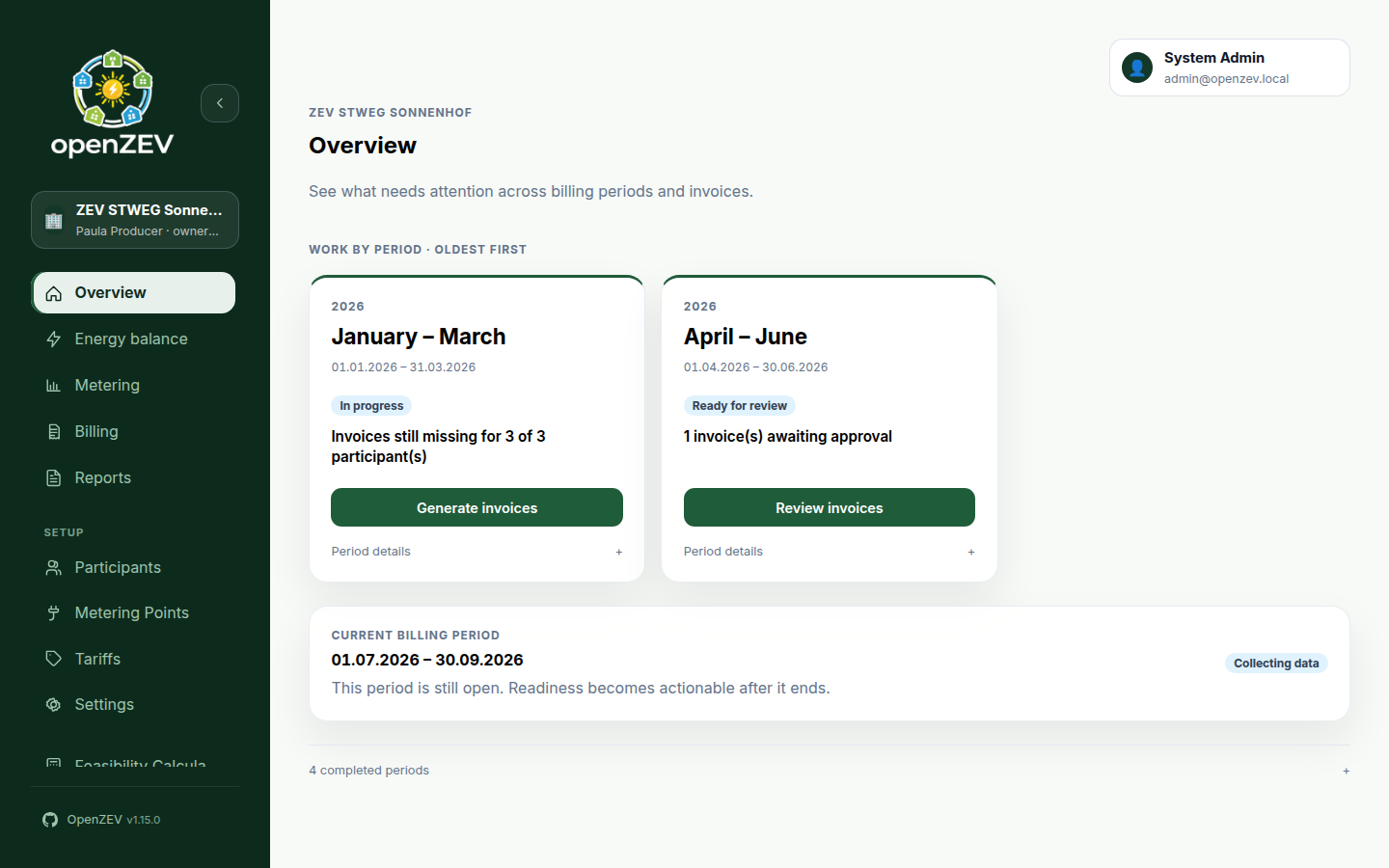
Billing periods, oldest first

Each period shows the action it needs, so you start on the work instead of going looking for it. The period that is still collecting data just says so.

OpenZEV overview screen listing billing periods by status, each with its next action
Energy balance

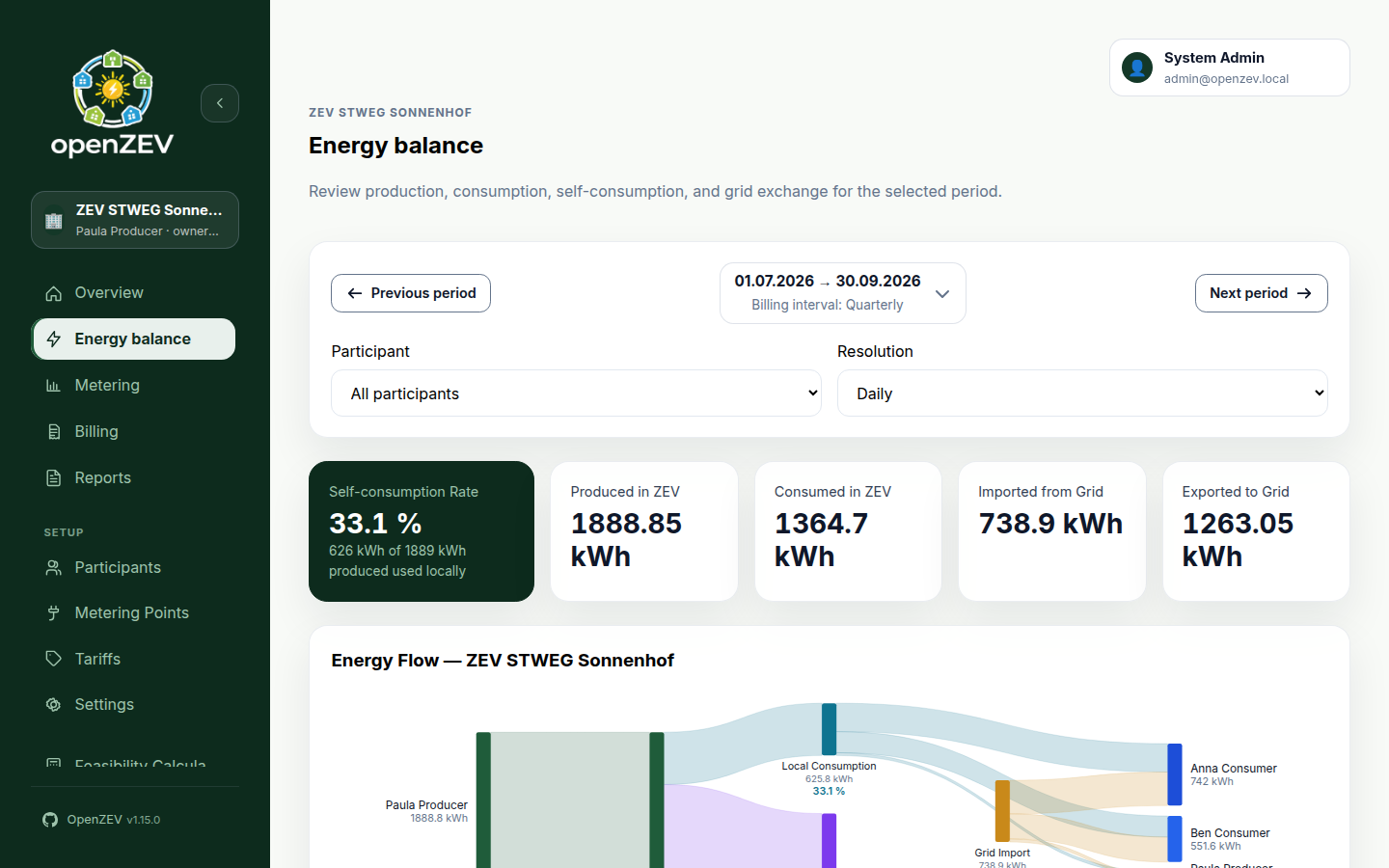
Where the solar actually went.

Production, consumption, self-consumption and grid exchange for the selected period, with a Sankey diagram tracing every kWh from producer to participant. Filter by participant or change the resolution down to the interval.

Energy balance screen with KPI tiles and a Sankey diagram of energy flow between producer, participants and the grid
Billing

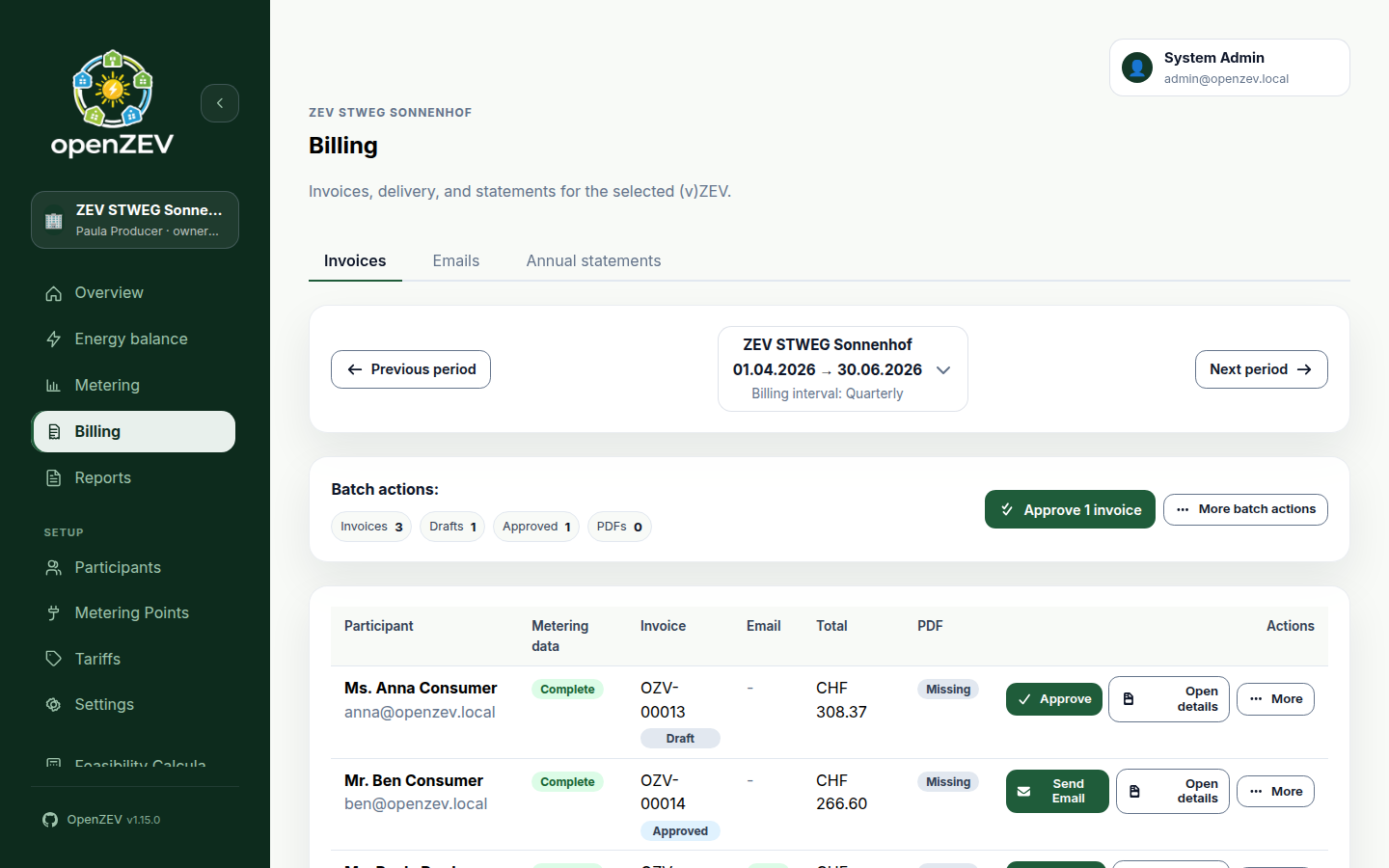
One row per participant

Every invoice for the period with its metering completeness, status, total and PDF state, plus batch actions for the steps you would otherwise repeat once per household.

Billing screen listing each participant's invoice with status badges, totals and batch actions
Tariffs

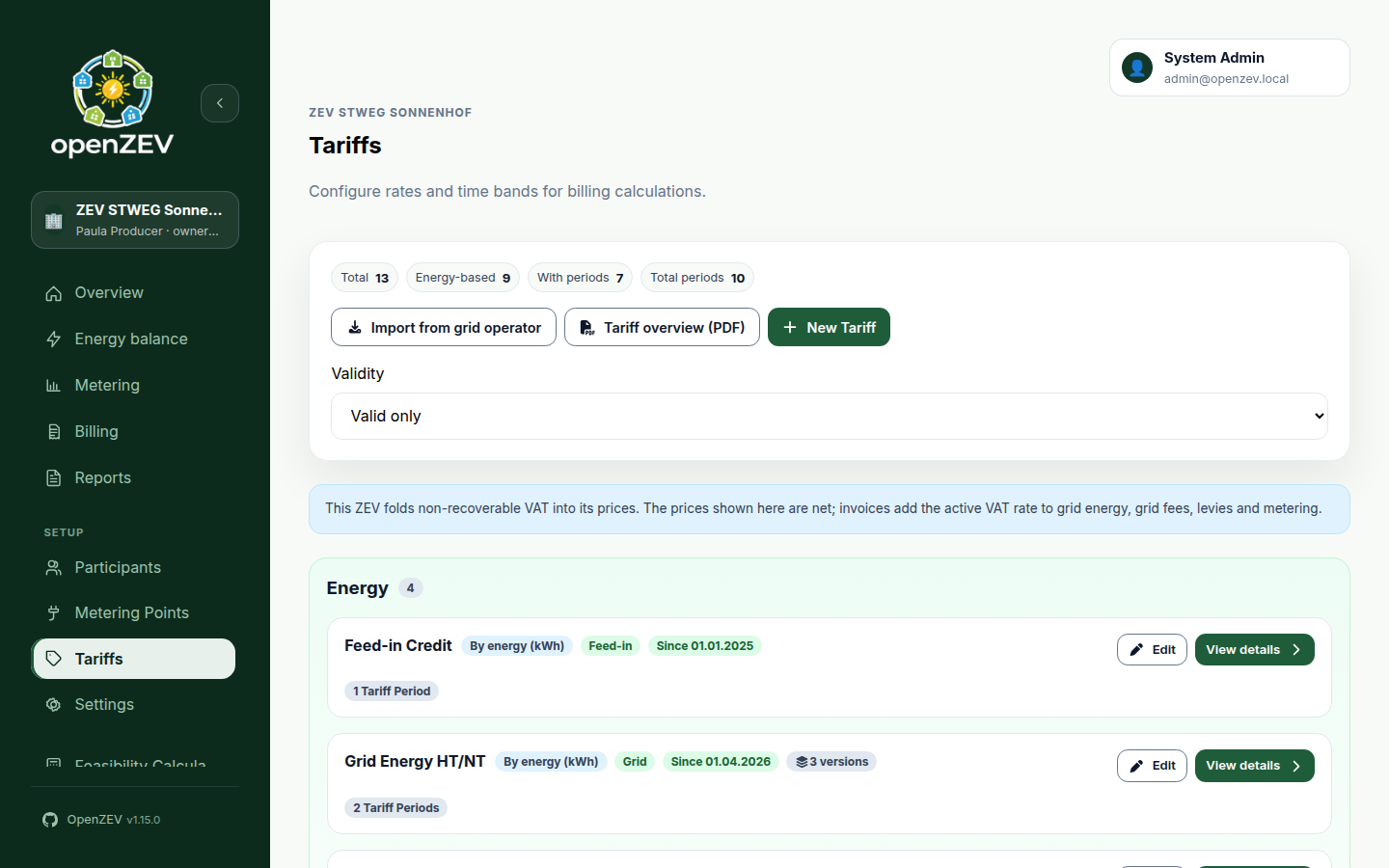
Every tariff change is a new version

A tariff is a series of versions, each with its own bands and validity window. An invoice raised last year still prices at last year's rate, and the chart shows when each change took effect.

Tariff detail drawer showing version history, a price history chart and the high and low tariff bands

Quick start

Three ways to run it

Pick the one that matches where you want it to live. All three pull prebuilt images from GHCR.

Try it

Demo community

Starts the stack and seeds a full community — participants, meters, tariffs and readings — so there is something to look at.

# clone, then:
scripts/start-demo-environment.sh

# → http://localhost:8080
# admin@openzev.local / admin1234
Self-host

Docker Compose

The full stack — frontend, API, Celery worker and beat, PostgreSQL and Redis — with no demo data.

docker compose up -d --build

# frontend  :8080
# api       :8001

docker compose down
Kubernetes

Kubernetes, via Helm

The chart deploys frontend, backend, worker and beat into your cluster with an Ingress and a media PVC. Bring your own PostgreSQL and Redis.

helm repo add openzev \
  https://splattner.github.io/openzev
helm repo update
helm install openzev openzev/openzev \
  -n openzev --create-namespace
Images ghcr.io/splattner/openzev-{backend,frontend,fullstack} Signed release manifests and SBOM attestations Databases PostgreSQL, MariaDB or SQLite via DATABASE_URL

Under it

The stack

Backend
Django, Django REST Framework, SimpleJWT
Frontend
React, TypeScript, Vite, React Query, i18next
Async
Celery worker and beat on Redis
Data
PostgreSQL, MariaDB or SQLite
API
OpenAPI schema with Swagger and ReDoc
Deploy
Docker Compose, or Helm on Kubernetes
Licence
AGPL-3.0 — run it, change it, host it. If you offer a modified version to others over a network, they get the source too.

Read this before you bill someone with it

I built OpenZEV to run my own ZEV, and I share it as-is, with no warranty. It suits people who enjoy running their own stack. Check your imports, your tariffs and your invoices before they reach a participant: responsibility for what the numbers say stays with you.

It is also built with a lot of AI assistance, down to the specs, ADRs and user documentation. Some choices will look unconventional to an experienced team. That is the trade I made: the project is optimised for learning, experimentation and running one real ZEV, rather than for enterprise process.